


CRIME Local
3.640.00 Reviews
App Specs
- Version
- 1.1.4
- Updated On
- License
- Free
- Downloads
- 10,000+
- Developer
- SpotCrime
- Categories
- News & Magazines
- Platform
- Android
Screenshots

 Analysis by AppCompare
I approach local crime apps with a practical question: will they help me understand what is happening nearby without turning every unfamiliar sound into a reason to worry? CRIME Local is a free news and magazines app from SpotCrime, and its purpose is to put crime-related local information in one place. I would treat it as a way to stay aware, not as a live emergency service or a complete picture of neighborhood safety.
That distinction matters from the start. Reports can give useful context, but a marker or headline does not explain every circumstance behind an incident. I find the app most valuable when I use it to inform ordinary decisions—such as checking what has been reported nearby—rather than to make assumptions about people or places.
What to expect from a local crime feed
The app sits between a general local-news reader and a dedicated public-safety channel. Instead of browsing broad headlines, I can focus on incidents associated with an area. That narrower scope is useful if neighborhood crime news is what I want, but it also means I should not expect a full local-news experience covering every community issue.
CRIME Local is rated for Everyone, and the current version is 1.1.4. It has an average rating of 3.6 from 118 ratings, with 40 written reviews, and has passed 10K installs. I read those figures as a sign that people have tried it, not as proof that its reports will be equally useful in every location. Coverage and the amount of detail a reader sees can shape the experience more than a broad rating does.
My first useful expectation would be modest: open it to check what information is available around a place I care about, then decide whether that view helps me. The app’s value is local context, not a promise that every event will appear immediately or that an incident marker alone can tell me what action to take.
Getting from installation to a useful first check
Living in a bustling city, it’s hard not to be curious about the happenings in your vicinity, especially when sirens are a common backdrop to your evening Netflix session. I wanted an app that could keep me informed about local incidents without bombarding me with unnecessary alerts. CRIME Local promised to be just that: a personal crime radar, if you will.
Getting Started with the App
Installation was a breeze. A quick search in the App Store, a tap on download, and I was ready to go. The interface is clean and intuitive, which is a relief. No one wants to wrestle with clunky menus when trying to get quick information. Setting up my profile was straightforward, asking for permission to access my location to provide accurate data.
Worth Reading Before You Choose

EA SPORTS FC Mobile 26 Is a Bigger Football Game, but It Takes Time

Flipboard Shows What News Apps Must Do Beyond the Feed

Switching to Android Auto Means Rethinking Your Driving Routine

Google Calendar Makes a Crowded Week Easier to Manage

Ludo King Makes the Most of the Minutes Between Plans

Baby Panda World Brings Quick Play to Modern Phones, but Its Game Library Feels Busy
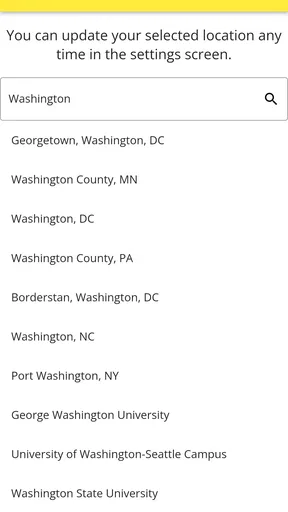
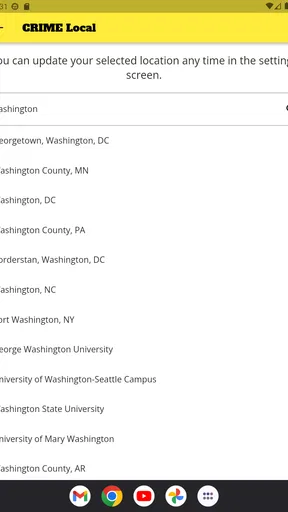
For a first run, I would begin by looking at the map before deciding how much location access I am comfortable granting. Location can make a nearby view more convenient, but it is worth checking what the app requests and choosing settings deliberately. If I prefer not to share my current location, I would look for a way to browse by area or use any available non-location route rather than tapping through permissions automatically.
My first meaningful check would be a specific, familiar place: the blocks around home, a route I use regularly, or the area near a planned evening stop. A small, recognizable area makes the map easier to interpret than a broad scan of an entire city. I would tap an incident marker, read its description and timing, and then check whether the information actually changes a decision I need to make.
Features: What Does It Offer?
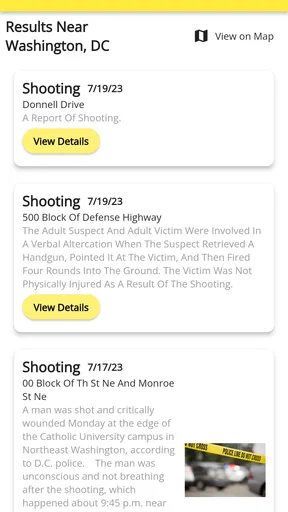
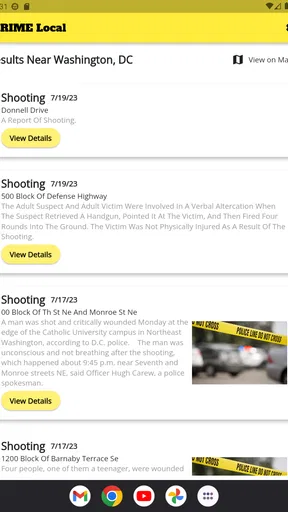
Once set up, the app opened up a map showing recent crime reports in my area. Each incident is marked with icons that make it easy to identify at a glance whether it's a burglary, assault, or something less sinister like a noise complaint. It’s almost like having a neighborhood watch on your phone!
A particularly neat feature is the ability to set notifications for specific types of incidents. Not too keen on getting alerts for every minor incident? No worries, you can tweak the settings to suit your needs. There’s also an option to contribute by reporting incidents, which adds a community-driven aspect to the app.
Notifications are most useful when I treat them as a narrow filter, not as an all-purpose safety system. I would choose only the categories that could genuinely affect my routine, then see whether the resulting alerts are informative or distracting. If I am already checking the map before a particular outing, notifications may add little; if I want occasional awareness without repeatedly opening the app, a carefully chosen alert category could make more sense.
There is also a trade-off in contributing reports. Community input can make a local feed feel more connected to what residents notice, but a user-submitted report should not automatically be treated as confirmed or complete. I would describe only what I know, avoid guessing about who was involved, and rely on emergency services—not an app report—if someone needs immediate help.
Usability: Is It User-Friendly?
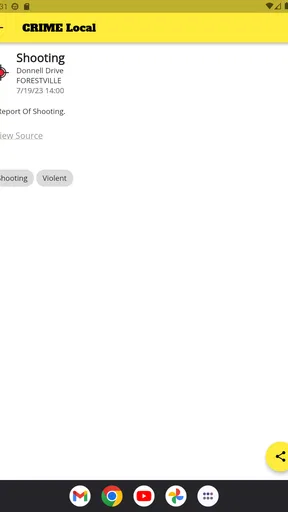
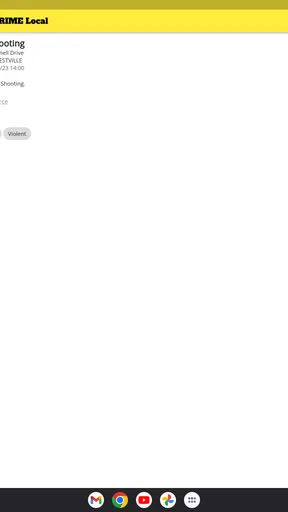
Navigating through CRIME Local is smooth. The app is designed to keep things simple, focusing on functionality over flashy graphics. For instance, tapping on an icon gives you a brief description of the incident, when it happened, and any available updates. This is super helpful if you’re trying to piece together the story behind all those flashing lights down your street.
A useful habit is to read the incident details before reacting to the map’s symbols. A pin is a starting point, not a complete account: timing, category, and any available update can change how relevant it is to my plans. If the description is brief, I would avoid filling in missing context with assumptions. For a decision that depends on current conditions, I would also check a more direct source rather than treating an older report as a live status update.
Common confusion: alerts, reports, and privacy
One of the first things I checked was how the app handles user data. With any app that requires location access, privacy is a valid concern. Thankfully, CRIME Local emphasizes data security, ensuring that personal information isn’t shared or sold. Plus, you have the option to use the app without signing up, which is a nice touch for those who prefer to stay anonymous.
I would still distinguish between browsing without an account and granting device permissions: they are separate choices, and I would review each one as it appears. A person who is cautious about location can keep access limited to what feels necessary and reassess later. That is a more comfortable approach than assuming every permission is essential just because it makes the first screen easier to reach.
Another easy misunderstanding is to read an alert as proof that a danger is happening right now. Alerts and reported incidents provide information, but they do not replace a call to emergency services or official instructions during an urgent situation. If an alert concerns a familiar area, I would check its details and timing first, then use appropriate official channels for anything requiring an immediate response.
For an everyday example, imagine I am planning to walk home after dinner and receive an alert connected to a nearby area. I would open the relevant report, check when it occurred and what the description says, and then decide whether I want to take a familiar alternative route. I would not infer that every street nearby is unsafe, nor would I forward an unverified claim to a group chat as fact. That careful second look is where a local map can be helpful without letting it dictate the whole evening.
Real-World Application: How Useful Is It?
Having used the app for a few weeks now, I find it’s become a valuable tool in my daily routine. Whether checking before a late-night jog or deciding on the safest route home, it provides peace of mind knowing what’s happening around me. It’s also sparked a greater sense of community awareness, as I find myself more engaged with local news and discussions.
For a parent, the practical use may be checking an area before a child’s regular walk, while someone who works late might prefer a quick look before leaving for the commute home. A renter comparing a few nearby blocks could also use the map as one small part of learning about an area. In all of these cases, I would pair incident reports with direct observation and other reliable local information; a crime feed is not a substitute for judging lighting, transport, or the conditions on a particular street.
Compared with checking a general news app, this focused approach can save time when I only want crime-related local reports. Compared with neighborhood social groups, it may offer a more map-oriented way to browse incidents rather than relying entirely on a fast-moving discussion. The trade-off is that neither a focused feed nor a community post necessarily gives the fuller context that a local reporter or official source might provide. When accuracy and immediate guidance matter most, I would use those sources alongside—or instead of—the app.
The app will be a better fit for someone who wants a quick, location-centered view and is comfortable interpreting reports cautiously. I would skip it if I wanted comprehensive local journalism, guaranteed real-time emergency updates, or a definitive measure of whether a neighborhood is safe. It may also be a poor match for anyone who finds crime alerts stressful; narrowing notifications can help, but choosing not to use alerts is a perfectly sensible option.
Next step: make the feed useful without letting it take over
If the first map check feels relevant, I would make one small adjustment at a time: settle on the area I actually care about, review which incident categories matter to my routine, and only then decide whether notifications are worth keeping on. This avoids turning a useful check into a stream of interruptions. If the map has little information for a place I care about, I would not assume that means nothing has happened; I would simply use other local sources for a fuller picture.
On Android, the app’s minimum operating-system requirement is Android 6.0. It is free, so trying a limited setup does not require a purchase, and the Everyone age rating makes it broadly accessible. I would still use the same judgment as with any crime-related feed: keep descriptions factual, protect personal details when contributing, and do not use a report to identify or confront someone.
Final Thoughts: Should You Download It?
If you’re someone who likes to stay informed and values neighborhood safety, CRIME Local is definitely worth a download. It’s easy to use, doesn’t overwhelm you with unnecessary info, and most importantly, keeps you in the loop about what’s going down in your area. Plus, it’s a great conversation starter with neighbors!
So, whether you’re a concerned parent, a night owl, or just someone who likes to know what’s happening around them, give CRIME Local a shot. It might just change the way you see your neighborhood.
My recommendation is to start with one familiar area and a clear purpose, such as checking a regular route, rather than turning the app into a constant monitor. If its local reports help you make a calmer, better-informed choice, keep it in your routine; if you need authoritative emergency information or broader reporting, reach for those sources instead. Used with that boundary, it can be a useful extra window onto the place where you live.
Pros
- User-friendly interface and navigation.
- Real-time crime alerts and updates.
- Customizable notification settings.
- Detailed crime map and statistics.
- Community tips and safety resources.
Cons
- Limited coverage in rural areas.
- Requires constant internet connection.
- Occasional notification glitches.
- Advertisements can be intrusive.
- Some features locked behind paywall.
FAQs for CRIME Local
What is CRIME Local and how does it work?
CRIME Local is an app designed to keep users informed about crime activities in their vicinity. By utilizing real-time data and user-generated reports, the app provides alerts and updates on incidents happening nearby. It helps users stay aware of potential risks and enhances personal safety by offering a community-driven, comprehensive overview of local crime trends.
Is CRIME Local free to use, or are there any premium features?
CRIME Local is available as a free download, offering basic features like crime alerts and updates. However, it also offers premium features through a subscription model. These may include advanced alert customization, detailed crime statistics, and access to historical data, enhancing user experience and providing more in-depth insights into local crime patterns.
How accurate is the crime data provided by CRIME Local?
CRIME Local aggregates data from multiple sources, including law enforcement agencies and real-time user reports. While the app strives for accuracy, the reliability of the information can vary based on the source. Users are encouraged to verify critical details and use the app as a supplementary tool rather than a primary source for immediate safety decisions.
What privacy measures does CRIME Local implement to protect user data?
CRIME Local is committed to user privacy, employing robust encryption and data protection protocols. Personal information is minimized to only what is necessary for app functionality. Users have control over their data, with options to manage location sharing and choose which notifications to receive, ensuring a balance between safety and privacy.
Can CRIME Local be used internationally, or is it limited to specific regions?
CRIME Local is primarily designed for use in specific regions where it has established partnerships with local authorities and communities. While it may function in other areas, the data accuracy and availability of features might vary. Users should check the app's coverage in their area to ensure optimal performance and relevant updates.


